
My iTunes Library does not display.
To display your iTunes library on rekordbox, first double-click [iTunes] in the Tree view to open the groups, then select [All Audio]. For an iTunes playlist, open [Playlists] and select the playlist with which to display the library.
*Tracks are not displayed when only [iTunes] is selected.
The settings will vary depending on the computer being used.
- For Mac
In the latest version of rekordbox, no settings are required.
- For Windows
The iTunes Library may not be always created when using iTunes12.2 and later.
From iTunes, Preferences > Advanced, tick the box of “Share iTunes Library XML with other applications” to enable this function.
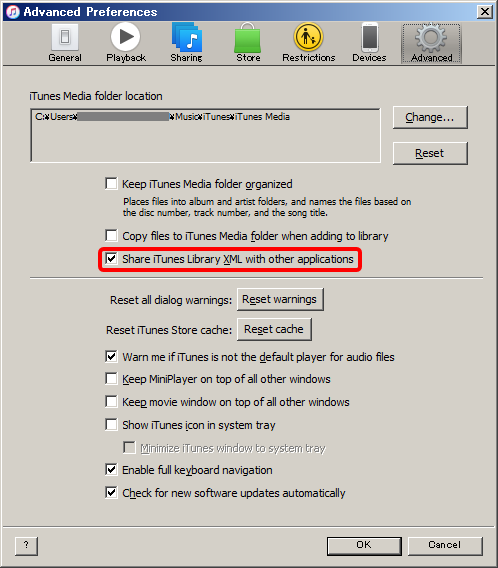
Then, please reboot both iTunes and rekordbox after shutting them down.
If the playlist folders are not properly shown, please update rekordbox to Ver. 3.2.2 or later to solve the issue.
The iTunes Library file may not be specified properly. To designate the proper iTunes Library xml file, go to [Preferences] > [Advanced] > [Database] and select the xml file for the iTunes Library.
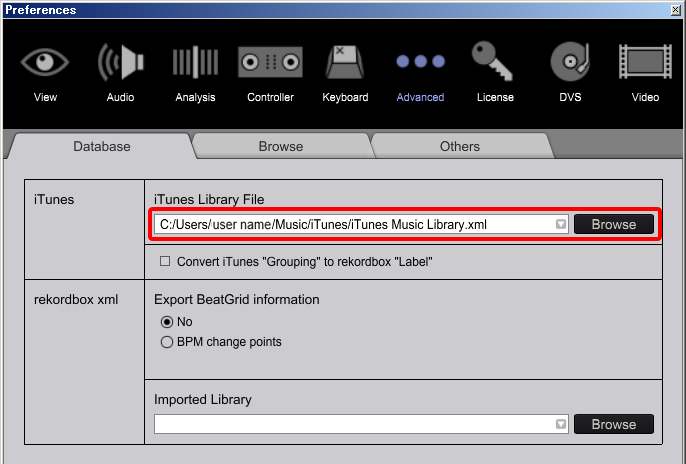
With rekordbox settings files transferred from a different computer, the iTunes Library file may be changed from iTunesMusicLibrary.xml to iTunesLibrary.xml.
If this is the case with your file, change the above setting to iTunesLibrary.xml.
