
Workaround when macOS does not recognize your DJ equipment
- Connect your computer with your DJ equipment using a USB cable. Turn on the power of the DJ equipment.
- Open [Finder] and select [Applications] from [Go] on the menu bar.
- Run [Audio MIDI Setup] in the [Utilities] folder.
- Ensure that [Audio MIDI Setup] is shown on the menu bar. Then, select [Show MIDI Window] or [Show MIDI Studio] from [Window] drop-down menu.
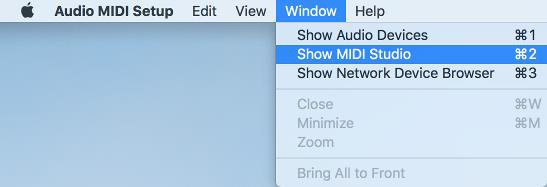
- [MIDI Studio] window opens up.
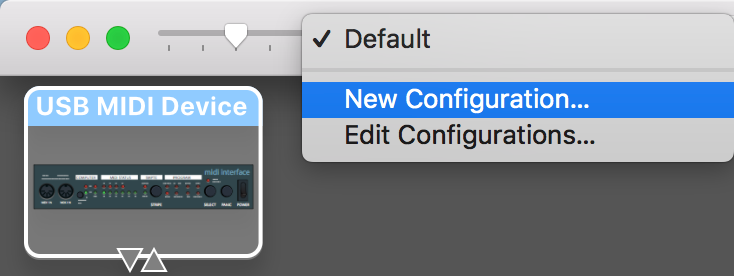
➢ [USB MIDI Device] may appear, instead of the connected DJ equipment.
- Switch [Default] to [New Configuration] from [Configuration] drop-down menu.
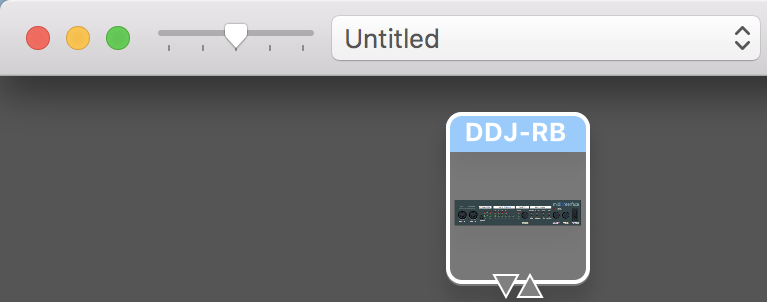
- Make sure that [USB MIDI Device] is changed to the connected DJ equipment.
➢ An example when DDJ-RB is connected to macOS.
About Trademarks and Registered Trademarks
- Mac and macOS are registered trademarks of Apple Inc. in the U.S. and other countries.
