
No sound is output from the headphones or from Master Out.
There are various possible causes. Check the following.
(1) Are the connection cables connected properly? Connect the connection cables properly. For details, see "Connecting input terminals" and/or "Connecting output terminals" in the operating instructions.
(2) Are the terminals and plugs dirty? Clean the terminals and plugs before making connections.
(3) Is the MASTER ATT level selector switch set to -6 or -12dB? Switch the master output attenuator level in the utilities mode. For details, see “Changing the settings” in the operating instructions.
(4) Check the procedure to output audio.
[Select output audio]
Select the sound source used by each channel.
Select the CH1/CH2 input source.
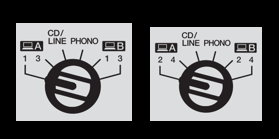
[USB]: Selected when using the Serato DJ software to access tracks loaded on the deck.
[PHONO]: Selected when using an output device of phono level (for MM cartridge) such as an analog player connected to the [CD/LINE] input terminal.
[CD/LINE]: Selected when using a line level output device such as a DJ player connected to the [CD/LINE] input terminal.
[Output audio]
The following explains how to output audio of Channel 1.
-Output audio from Master Out.
Set the volume of the devices (power amplifier, powered speakers, etc.) connected to the [MASTER 1] and [MASTER 2] output terminals to an appropriate level. Note that loud sound will be output if the volume is set too high.
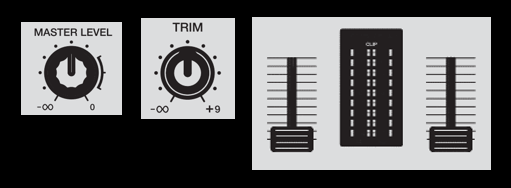
1. Set the positions of the controls, etc., as shown below.
[MASTER LEVEL] ・・・Fully counterclockwise
[TRIM]・・・Fully counterclockwise
[Channel Fader]・・・Minimum
2. Play the track.
3. Raise the channel fader.
4. Turn the [TRIM] control.
Adjust [TRIM] so that the orange indicator on the channel level indicator lights at the peak level.
5. Turn the [MASTER LEVEL] control to adjust the speaker audio level.
-Output audio from the headphones.
1. Set the positions of the controls, etc., as shown below.
[HEADPHONES MIXING]・・・Center
[HEADPHONES LEVEL]・・・Fully counterclockwise
[HEADPHONES CUE Fader]・・・Center
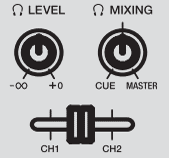
2. Turn the [HEADPHONES LEVEL] control.
Adjust the audio level output from the headphones to the appropriate sound volume.
The operation instructions can be obtained from the following Pioneer DJ page.
DJM-S9 Manual
