
DDJ-SZ Virtual DJ 8 Pro
Latest update : 24/Jul/2015
For all information about VirtualDJ 8 Pro, please visit www.virtualdj.com.
DDJ-SZ supports the latest DJ Software VirtualDJ 8 Pro now.
Support Operating System
For the latest information on the operating environment of Virtual DJ 8 Pro, please visit virtualdj.com.
VirtualDJ 8 Pro
DDJ-SZ now supports VirtualDJ 8 Pro.
VirtualDJ 8 Pro is available from the Atomix website below for free of charge.
www.virtualdj.com/SZ
You need a “Key code” when you download VirtualDJ 8 Pro.
A "Key code" card is included in each box of DDJ-SZ shipped in mid December and later.
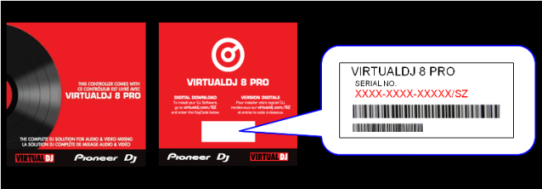
Please refer to the VirtualDJ 8 Pro setup guide below for installing the application.
VirtualDJ 8 Pro setup guide
Please refer to Hardware diagram below for VirtualDJ 8 Pro.
Hardware diagram
Please refer to the following website for VirtualDJ 8 Pro User's Guide.
www.virtualdj.com/wiki/PDFManuals.html
www.virtualdj.com/wiki/VirtualDJ8%20Controllers.html
Your computer might not work as expected when multiple versions of Virtual DJ application are installed. Ensure that you install a version of Virtual DJ application you need only after uninstalling all the already installed versions of Virtual DJ. Please refer to the Virtual DJ uninstall guide below for uninstalling older versions of Virtual DJ.
Virtual DJ uninstall guide
