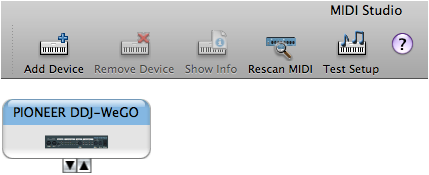
"NO DEVICE CONNECTED" appears even when Serato DJ / Serato DJ Intro is launched and DDJ-WeGO cannot be connected to the software.
Please follow the instruction below.
1. Only for Serato DJ users: Did you activate Serato DJ after it is launched on your computer?
Please see the "Serato DJ Setup Guide" for details of activation method, then activate Serato DJ.
2. Are the firmware of DDJ-WeGO and software of Serato DJ / Serato DJ Intro updated to the latest versions?
Please see the PioneerDJ support page below to check the latest versions.
3. Close Serato DJ / Serato DJ Intro and after turning off the power of DDJ-WeGO, turn the power on again.
Ensure that the launch illumination of DDJ-WeGO is completed. Then, launch Serato DJ / Serato DJ Intro.
4. Are there any other DJ applications than Serato DJ / Serato DJ Intro running on your computer?
After shutting down all the other DJ applications, launch Serato DJ or Serato DJ Intro.
*The procedures below are only for Mac users.
5. Check the Audio MIDI Setup.
1) Ensure that the power of DDJ-WeGO is turned off.
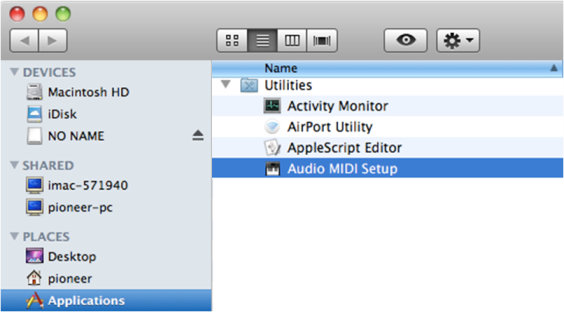
Open [Application] -> [Utility] -> [Audio MIDI Setup].
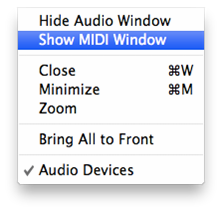
2) Click [Window] in the menu and select [Show MIDI Window].
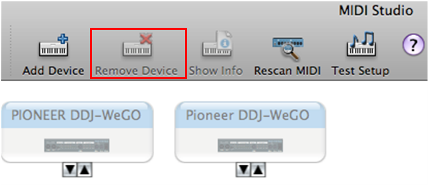
3) In the [MIDI Studio], select "PIONEER DDJ-WeGO" and select [Remove Device] to delete it.
If "Pioneer DDJ-WeGO" (Only "P" is upper case and "ioneer" are lower case.) is also displayed,
select [Remove Device] to deleted it.
4) Turn on the power of DDJ-WeGO and ensure that "PIONEER DDJ-WeGO" is displayed in [MIDI Studio].
Then, launch Serato DJ / Serato DJ Intro.