
The jog dial does not respond to touching.
Check the following.
(1) Is the jog dial dirty?
An electrostatic system is used as the detection method in the jog dial of DDJ-SX3. Therefore, if the jog dial is dirty or the user has hand cream on their hands, it may not respond.
When cleaning the jog dial, dry wipe it with a soft cloth. If it is very dirty, prepare a 5:1 or 6:1 solution of water and neutral detergent, immerse a soft cloth in the solution and wring the cloth out well, then clean the jog dial and wipe it with a dry cloth after that.
(2) Is the sensitivity of the jog dial's touch sensor set to the minimum value?
Adjust the sensitivity so that the jog dial responds to touching. For details, see "Adjusting the sensitivity of the jog dial's touch sensor" in the operating instructions.
(3) If the jog dial does not respond to touching even though the jog dial's touch sensor is set to the maximum value, check the following.
-Touch the jog dial while touching anywhere on DDJ-SX3.
If the jog dial does not respond to touching, DDJ-SX3 may have a problem.
If the jog dial responds to touching, DDJ-SX3 may be subject to the influence of connected devices.
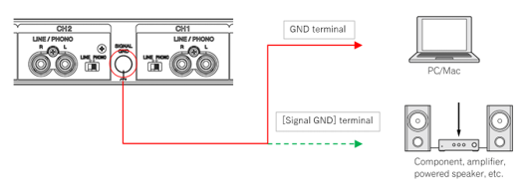
-The jog dial’s touch sensor may not work properly depending on the connection environment (ground connection status, etc.) of some computers (e.g. a BTO computer) or amplifiers connected to DDJ-SX3.
Check the following.
-Check by connecting the [Signal GND] terminal of DDJ-SX3 with the GND terminal of the computer or with the [Signal GND] terminal of the amplifier.
Caution
This connection is not a standard method. When you use an analog player, noise may occur.
